Overclocking
Overclocking raises clock speeds beyond the factory setting to get more work out of the same card. It costs voltage, and power rises roughly with the square of voltage, so the last few percent are expensive.
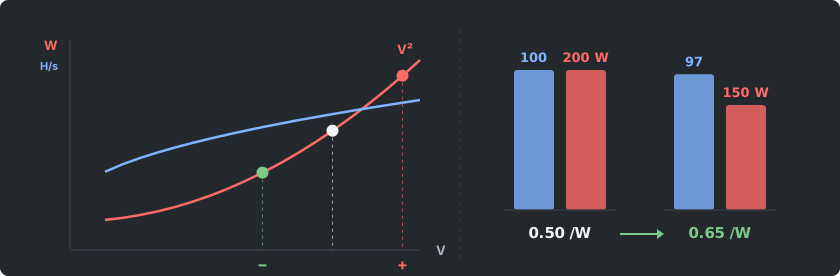
A chip's dynamic power grows with its clock speed and with the square of its voltage. So a 10 percent voltage increase adds about 21 percent to that part of the power draw. So running at a slightly lower voltage usually saves more power than the speed it gives up.
On a GPU you usually tune three things: the core clock, the memory clock and the power limit. Memory-bound algorithms reward a memory overclock and run fine with a lowered core. Core-bound ones need the core and its voltage. Your miner's README often lists starting values per card.
For mining it is usually the wrong direction. Undervolting earns more per watt on most algorithms, and a memory overclock that is slightly too far produces failed shares rather than an obvious crash. What you want is the best hashrate per watt, not the highest hashrate.
A worked example. Say a card makes 100 units of hashrate at 200 watts. Undervolted, it makes 97 units at 150 watts. It lost 3 percent of its speed but saved a quarter of its power, so it earns more per watt and runs cooler.
The common mistake is to judge a setting by hashrate alone. An unstable setting can show a high hashrate while sending wrong results. Watch the rejected and invalid share count, not just the speed. If it rises after a change, step back.
Change one setting at a time and let the rig run for a while after each step. Keep an eye on temperatures, including memory temperature where the card reports it. A setting that is stable on a cool day may not be on a hot one, so leave a small margin.