








Pool mining security
A security checklist for pool miners: protect your wallet and recovery phrase, check every address, and lock down your system, browser and network.
Why is security your job?
When you mine in a pool, you give the miner one thing: the wallet address your payouts go to. There is no account and no password to create. You download a miner, point it at the pool with your address, and start earning.
Simple does not mean security is someone else's problem. Payouts go straight to your own wallet, non-custodially. So you alone are responsible for the safety of your coins.
Five basic steps keep them yours:
- Protect your wallet and its recovery phrase.
- Check every address you paste.
- Keep your operating system clean.
- Keep your browser clean.
- Secure your network.
Step one: how do you protect your wallet?
Most wallets have two layers of protection:
- An everyday PIN or password that unlocks the app.
- A secret recovery phrase, also called a seed phrase, that can restore the whole wallet from scratch.
The recovery phrase is the one that matters most.
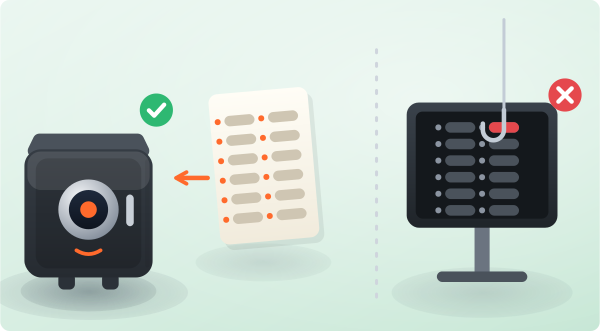
Never give out your password, PIN or recovery phrase to anyone. No one should know them, not even a pool's support team. Anyone who asks is trying to steal your coins.
Store these secrets safely. If someone else gets them, they get your money:
- Do not use your card PIN or your date of birth as a PIN. Do not use the same PIN everywhere.
- If an email account can reset your wallet, give that email a unique password. Turn on two-factor authentication (2FA), a second code on top of the password.
- Keep your recovery phrase offline, where it cannot be lost and no one else can reach it.
- On a phone wallet, lock the phone itself with a fingerprint or a strong PIN or pattern.
Why should you not mine to an exchange address?
Do not mine straight to an exchange deposit address. Not your keys, not your coins:
- Exchanges can change deposit addresses without warning. Payouts sent to an old address can be lost for good.
- You do not hold the private key, so you never fully control the funds.
- An exchange can freeze your account. Some do not credit small mining payouts reliably.
- A pool payout address is fixed once you mine to it. If the exchange changes or closes, the pool cannot recover or redirect your coins.
Step two: how do you check an address?
Always double-check a wallet address after you copy and paste it.
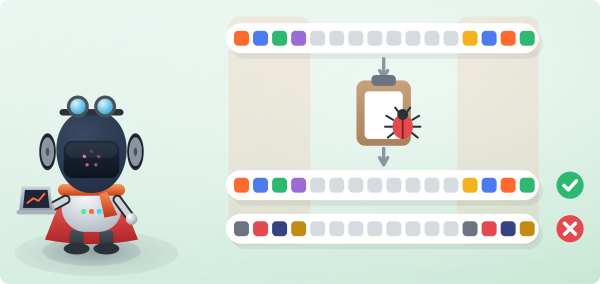
Clipboard-hijacking malware watches your clipboard for a crypto address. When you paste, it silently swaps in the attacker's address. If you do not check before you send, the coins are gone for good.
Check the first and last few characters of an address every single time you paste it. One swapped address is one irreversible loss.
Step three: how do you secure your computer?
An unprotected computer is the weak link. Digital safety is on you, and if you ignore it no one else can cover for you.
- Do not visit shady sites or download from unverified sources.
- Antivirus tools often flag mining and overclocking tools. Sometimes it is a false positive, and sometimes a fake copy really is infected.
- Only download your miner, for example SRBMiner or WildRig NG, from its official page.
- If your antivirus flags a file you are certain is genuine, add that one file to the exceptions. Never add a whole folder, because malware can hide in the rest of it.
- Do not run cracked or pirated Windows, cracks or hacks. Use clean, licensed software.
- Avoid remote-access tools you do not need. An intruder with remote control of your PC can do anything.
- Keep the operating system updated. Updates exist to close security holes, not to annoy you.
Not sure about a file? Do not risk it. Scan it first at a service like VirusTotal before you run it.
Running HiveOS or RaveOS? Never share your rig IDs or access keys, secure the email tied to the account, and enable 2FA.
Step four: how do you keep your browser safe?
You open your dashboard and your wallet in your browser, so keep it clean:
- Install a browser only from its official source, never from a torrent or a random build.
- Do not add suspicious extensions. A malicious add-on can read your passwords and your pages.
- Use an ad blocker and pop-up blocking. They cut out a common route for scams and drive-by downloads.
- Keep the browser updated so you get the latest security fixes. Updates are free.
Step five: how do you secure your network?
Make sure the network you mine and manage your wallet on is secure:
- Do not use public Wi-Fi for anything sensitive. Public connections are easy to intercept, so a phone hotspot is safer.
- Change the default Wi-Fi password and the router admin login. The classic admin / admin is not a password.
- Anyone on your Wi-Fi is inside your network.
- If your router is more than a few years old, consider replacing it. Newer routers get security fixes and a better built-in firewall.
What else can you do?
Attacks get more sophisticated every year, but the basics never go out of date:
- Keep your software licensed and updated.
- Keep your secrets offline and private.
- Slow down before you paste an address or run a file.
Be vigilant. Your security is in your hands.