








Undervolting: why running slower usually earns more
Why lower power costs less work than it saves, how to find your own best setting step by step, and why work per watt matters more than hashrate.
Which number should you tune for?
Tune for work per watt, not hashrate. Undervolting means running a card at a lower voltage or power limit than its default, and this is the number it improves.
Most people tune by watching hashrate, because the miner prints it biggest. That is the wrong number. It is why so many rigs earn less than their hardware could.
What you sell is work. What you pay for is watts. So work per watt decides whether a rig makes money, and hashrate alone says nothing about it.
Why does less power cost so little work?
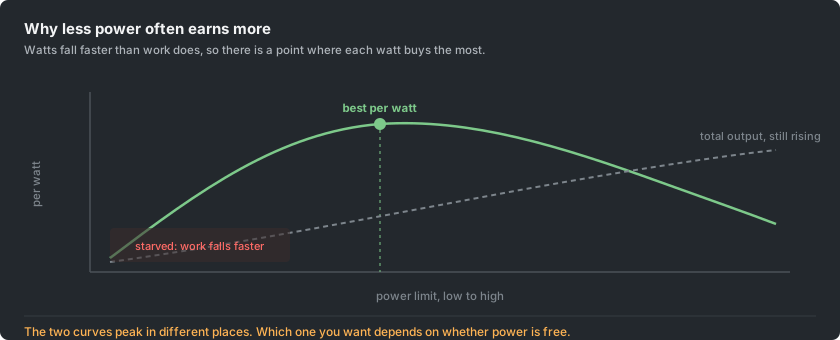
A card's power use rises roughly with the square of its voltage. The work it does rises roughly in line with its clock speed. Those are different curves, and the gap between them is the opportunity.
The last few percent of clock speed cost extra voltage, and voltage costs power squared. So that final stretch of performance is bought at a terrible rate. Giving it back saves far more watts than it costs in work.
When is it worth it?
It depends on what you pay for power.
- Free electricity: ignore all of this and run the cards flat out. Total output is what you want, and it peaks at the top of the range.
- Paid electricity, which is almost everyone: aim for the other peak, output per watt. Every watt saved is money kept, every hour of every day. That is how a few percent compounds into something that matters.
- Any price at all: a card run below its limit is cooler and quieter. Its fans work less and last longer, and the whole rig ages more slowly. That is worth something even if the arithmetic came out even.
How do you find your own best setting?
Nobody else's settings are yours. Two identical cards from the same box differ, by enough to matter. So this is a measurement, not a copied number.
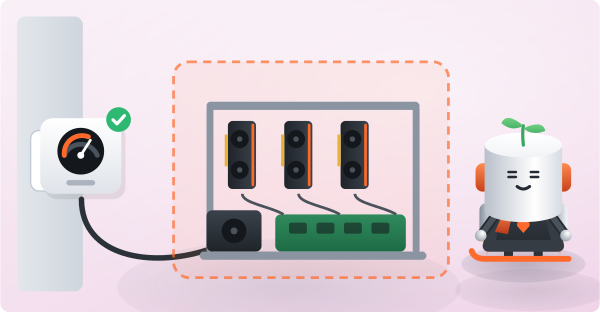
- Measure at the wall. A plug-in meter costs very little and sees the whole rig: the supply's losses, the risers, the board and the processor. The driver reports the card alone, and tuning on it hides part of what you pay.
- Change one thing at a time. Give each setting at least 30 minutes, and an hour is better, because thermal behaviour settles slowly.
- Work downward in steps. Drop the power limit, then record the work and the watts. Repeat.
- Watch the ratio of work to watts. It climbs at first. Keep going until it stops climbing.
- That point is your answer. Past it the card is starved, and work falls faster than power. That is the other side of the same curve.
- Test stability for a full day before trusting it. An undervolt that is slightly too aggressive does not crash. It produces work that fails validation, which is worse. The rig looks busy and earns less.
Should you tune the core or the memory?
On most algorithms, one of the two does the work and the other is along for the ride. Which one depends on the algorithm, not the card.
- Where memory does the work, the core can often drop a long way with almost no loss. That is where the easy watts are.
- Where the core does the work, the reverse holds. Memory can usually be left alone or brought down.
Memory is also where caution belongs. Raising memory clocks is the classic way to gain a few percent and lose more to failed shares. Those failures do not always announce themselves.
If you tune memory upward at all, watch the reject rate for a day, not the hashrate for a minute.
How do you know the tune worked?
A tune is finished when the pool agrees with it. The miner's console reports what the card attempted. Your dashboard reports what arrived and was accepted, and that is what you are paid for.
So compare a full day at the new setting with a full day at the old one. Use the dashboard average, not the live figure. Check that the reject rate has not moved.
An undervolt can save watts and quietly cost a few percent of accepted work. That is not an improvement, and the console will never tell you.