








Powering a rig: connectors, risers and the wall circuit
What each power connector can carry, why a SATA-powered riser is the classic rig fire, and how much one wall circuit can safely run all day.
What usually goes wrong in a mining rig?
Connectors fail far more often than cards. A burnt smell, a browned plug or a random reboot almost always has one cause. A piece of copper carries more current than it was built for, all day, for months.
So this is one area where exact numbers matter. The failure is not a card that stops working. It is heat in a place you never planned for it.
Rig power in short
- Use one cable from the power supply for each power socket on the card.
- Power a riser from its 6-pin PCIe or Molex socket, never from SATA.
- Seat a 16-pin connector fully and keep tight bends away from it.
- Size the power supply with headroom above the real load.
- Keep a long-running load under 80 percent of the circuit's rating.
How many cables does a graphics card need?
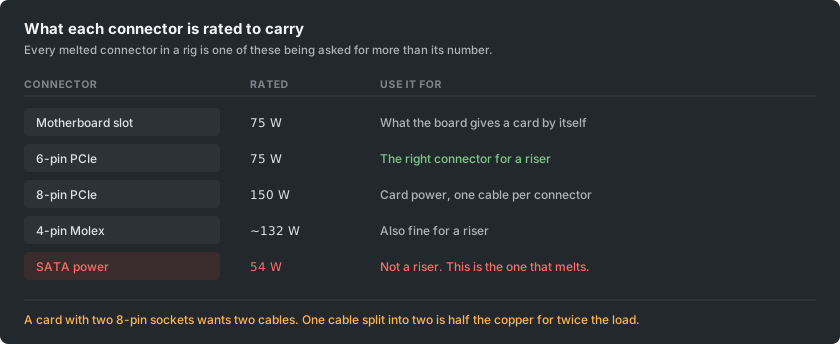
An 8-pin PCIe connector is rated for 150 watts. At 12 volts, that is about 12.5 amps through the plug and its wire. A 6-pin is rated for 75 watts, and the motherboard slot supplies another 75 by itself.
Many power supplies ship cables with two plugs on one lead. The second plug hangs off the first. It exists for cards that draw little power.
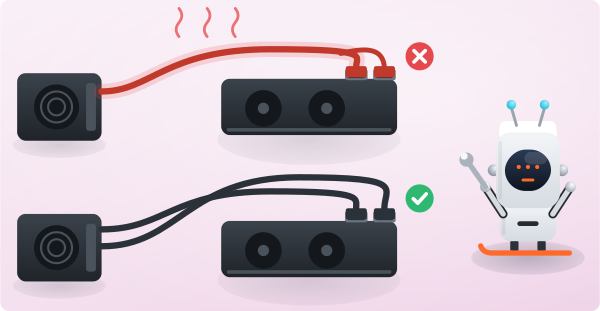
Using it on a big card is the most common mistake in a rig. Feed a card's two 8-pin sockets from one such cable, and that one lead carries both. That is about 25 amps through wire chosen for half of it.
The rule has no exceptions worth taking: one cable from the supply for each socket on the card. If the supply lacks enough separate cables, it is the wrong supply for that card. No adapter changes that.
Why is a SATA-powered riser the classic rig fire?
A riser is the small board that links a card to the motherboard by a cable. It needs its own power, because it feeds the card the 75 watts the slot would normally give. Risers offer a choice of power sockets, and one of them is wrong.
A SATA power connector is rated for 54 watts, and a riser can ask for more. SATA was designed for drives. Its contacts are small and flat, and they are often crimped rather than soldered.
On a riser, that connector carries more than its rating around the clock. This is why photos of melted SATA plugs are so common.
Use the 6-pin PCIe socket on the riser, or Molex, which is rated far higher. A riser that only offers SATA should be thrown away, not adapted.
A SATA-to-Molex adapter makes it worse, not better. The weak connector is still in the chain, now with an extra joint.
Do not chain several risers onto one cable either. Count the watts on the cable, not the number of plugs it happens to have.
How do you run a 16-pin connector safely?
Recent high-power cards use a 16-pin connector. It has a well-documented history of overheating and melting.
A revision shortened the sense pins, so a plug that is not fully seated is more likely to be noticed. Reports of melting have continued anyway. The card draws close to the connector's rating, and every contact must share the load evenly.
If you run one, follow these habits:
- Seat it until it clicks.
- Check that the case has not pulled it at an angle.
- Avoid tight bends near the plug.
- Skip third-party adapters unless you have a specific reason to trust one.
- Look at it now and then.
A card running near its limit for months has a harder life than desktop use. Desktop use is what these connectors were reviewed under.
How big a power supply does a rig need?
Add up what the cards draw at the power limit you actually run, not at their default. Add about 100 watts for the board, processor, drive and fans. Then leave headroom rather than sizing exactly to the total.
Headroom is about efficiency, not safety. A supply is most efficient in the middle of its range and worst at both ends. Run it near its ceiling all the time, and it wastes more of what you pay for and runs hotter.
An 80 Plus rating measures that efficiency. On a machine that runs nonstop, the gap between tiers is real money, not a detail on a specification sheet.
Above a certain size, two supplies in one rig is normal. They must start together and share a common ground. A synchronisation adapter does exactly that.
How much can one wall circuit run?
This is the limit people meet last and should meet first. It involves the building, not the rig.
A circuit is not rated for nonstop use at its full number. A load that runs for hours on end counts as continuous. The accepted limit for that is 80 percent of the circuit's rating.
| Circuit | Continuous limit |
|---|---|
| 15 amps at 120 volts | 12 amps, about 1,440 watts |
| 20 amps at 120 volts | 16 amps, about 1,920 watts |
| 16 amps at 230 volts | roughly 2,900 watts |
That limit covers the whole circuit, not the socket. Everything else on the same breaker counts against it. That is how a rig that ran for months trips a breaker when someone uses a heater in the next room.
The wall figure is also higher than the sum of the cards, because no supply is perfect. A rig with 1,200 watts of components may pull 1,300 watts from the wall.
Measure it with a plug-in meter instead of adding up specifications. The meter costs very little, and its number is the only one the breaker cares about.
Which habits prevent most rig problems?
- Buy the power cables from the same maker as the supply. Modular cables follow no standard. A cable from another unit can have a different pinout, which destroys hardware at once.
- Feel the connectors after the first hour at full load. Warm is fine, hot is not. A hot plug tells you which one is the problem.
- Keep a spare riser. It is the part most likely to fail and the cheapest to keep on the shelf.
- Put the rig on its own circuit if you can. Then nothing else in the house can decide your uptime.